
Welcome To The Colorful Minds Playground!
Pick an icon above to start playing. Each one opens up a brand-new game or activity right here!
Free Music Maker Game for Kids
Play piano notes, tap colorful drum pads, explore instruments and effects, record a song, and save it as a WAV audio file in this free browser music game for kids.
Play the Music Maker GameMake Music Right in Your Browser
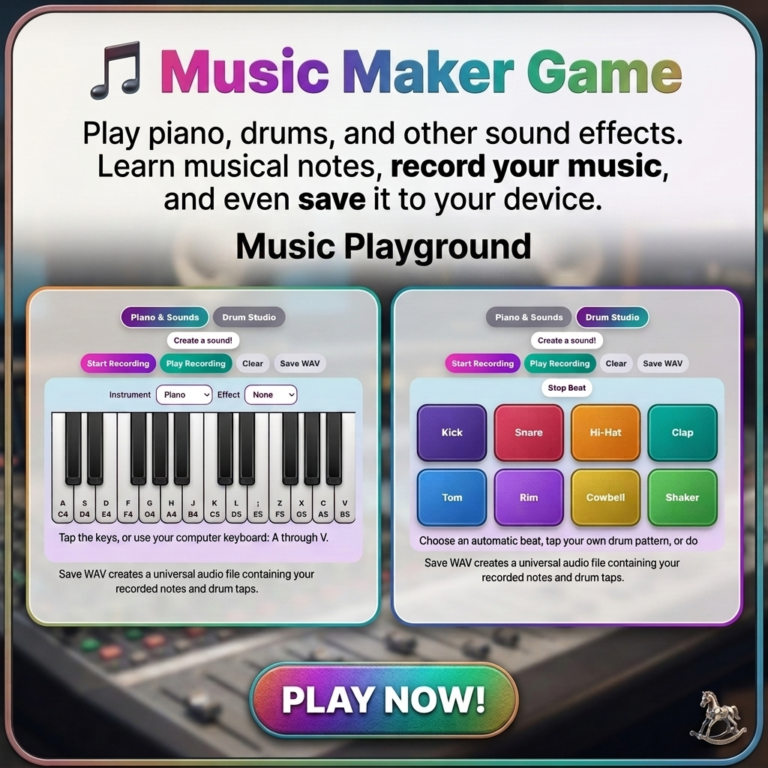
Music Maker is a free online music game for kids who want to experiment with piano notes, drum sounds, rhythms, instruments, and effects. Children can play a colorful two-octave piano, choose a sound like Piano, Marimba, Organ, Synth, or Bell, and add Echo, Sparkle, or Space effects while they play.
The Drum Studio gives kids another way to create. Tap individual pads for Kick, Snare, Hi-Hat, Clap, Tom, Rim, Cowbell, and Shaker sounds, or start a Pop, Rock, Dance, Calm, or Funky automatic beat. When a song is ready, children can record their notes and manual drum taps, replay the song, and save it as a WAV audio file.
How to Play the Music Maker Game
Play the piano
Tap piano keys with a finger or mouse. On a computer, children can also use the A through V keyboard keys to play the white piano notes.
Choose sounds and effects
Switch between Piano, Marimba, Organ, Synth, and Bell sounds. Add Echo, Sparkle, or Space to make each note sound different.
Try the Drum Studio
Tap drum pads to make your own beat, or choose an automatic Pop, Rock, Dance, Calm, or Funky rhythm to play along with.
Record and save a song
Tap Start Recording, play a short song, stop the recording, replay it, and save the recording as a standard WAV audio file.
What Kids Can Do in Music Maker
- Play a two-octave piano with touch, mouse, or keyboard controls
- Choose Piano, Marimba, Organ, Synth, or Bell instruments
- Add Echo, Sparkle, and Space sound effects
- Tap Kick, Snare, Hi-Hat, Clap, Tom, Rim, Cowbell, and Shaker pads
- Start Pop, Rock, Dance, Calm, or Funky automatic beats
- Layer piano notes over a drum rhythm
- Record a custom sequence of notes and manual drum taps
- Save a completed recording as a WAV audio file
Made for simple, low-pressure play: young children can tap any piano key or drum pad to hear a sound, while older kids can experiment with instrument combinations, rhythms, recordings, and saved songs.
Why a Music Game Can Be Helpful
Music play gives children a creative way to explore patterns, timing, sound differences, and self-expression. Every piano note and drum tap gives immediate feedback, making it easy for kids to experiment without needing to read music or know the right answer first.
Creating a short song can also support conversation and confidence. Families can ask a child to make a happy rhythm, create a calm sound, copy a simple beat, or play a song for someone else. The recording option gives children a way to hear their own creation again and celebrate what they made.
Frequently Asked Questions
What ages is this Music Maker Game good for?
The simple piano and drum tapping controls work well for toddlers and preschoolers, while the instruments, effects, beat patterns, recording tools, and WAV saving option give early elementary kids more to explore.
Can I play piano notes with a computer keyboard?
Yes. On a computer, the white piano keys can be played with the A through V keys as well as by clicking or tapping the piano.
What is the difference between the Piano and Drum Studio tabs?
The Piano and Sounds tab is for melodic notes and instrument choices. The Drum Studio is for rhythm, with individual drum pads and optional automatic beat patterns.
Can I save my song?
Yes. After recording notes and manual drum-pad taps, use Save WAV to download the recording as a WAV audio file that can be played on many devices and music apps.
Do automatic beats get included in saved recordings?
The saved recording includes sounds played while recording is active, including piano notes and drum pads tapped by hand. Automatic beats can still be used for play and practice.
Do I need to download anything or make an account?
No. Music Maker is free to use in a browser. No account, software download, purchase, or sign-up is required to start making music.
Play More Games
Visit The Playground to discover more free, browser-based games and activities for kids.
Explore The PlaygroundKeep Creating Offline
Explore free printable activities, routine charts, flashcards, worksheets, and more for kids.
Explore Free PrintablesExplore Our Shop
Find printable resources, kid-friendly books, and tools created to support colorful minds and everyday family life.
Visit the Shop